The Plant Shop Update History and Patch Notes
The newest announcement in the official feed we inspected is Steam Deck Verified, posted on 2026-09-20; the launch announcement came four days earlier. The developer says the game will be updated actively and asks for bug reports in the Steam discussions. The 2026-10-07 feed inspection returned five announcements and no fix list; it does not identify your installed build.
Last checked 2026-10-07
Every official The Plant Shop update, newest first
Latest: Steam Deck Verified announcement, 2026-09-20
Official: Official Steam announcements (opens in a new tab)Steam Deck Verified!
The game is now Steam Deck Verified. To load a save made on a PC, the developer suggests launching the Windows version with Proton on the Steam Deck.
The Plant Shop is OUT!
Launch day. The developer asks players to report bugs and suggestions in the Steam discussions and says the game will be updated actively.
+12.000 Wishlists!
The solo developer announces that the game passed 12,000 wishlists.
The Plant Shop releases on September 16th, 2026!
Release date announced for September 16, 2026, with gameplay improvements in progress.
Steam Next Fest!
The developer announces that the game takes part in Steam Next Fest.
The Plant Shop patch notes: is there a patch yet?
No fix list appears in the official feed inspected on 2026-10-07. The five posts are a Steam Next Fest announcement, the release date, a wishlist milestone, the launch post and the Steam Deck Verified note, and none of them lists fixes. The launch post says the game will be updated actively, so the first The Plant Shop update with patch notes should appear on the Steam news page. We add it here with a date as soon as it does.
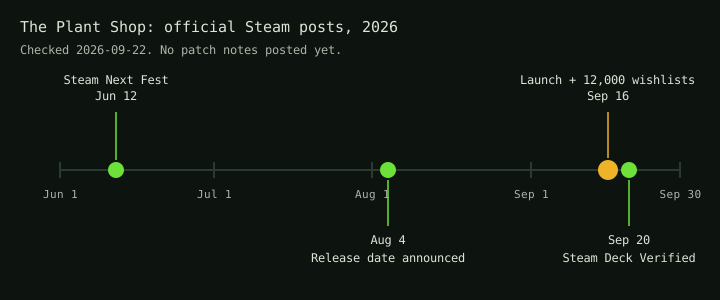
The game is made by one developer, Tori, who announced passing 12,000 wishlists on launch day. Every post on this page links to its original on Steam, so you can check the date of the latest one before you trust an older video or walkthrough.
The Plant Shop Steam Deck Verified update: what Steam checked
The newest announcement in the inspected feed is the September 20 post saying the game is Steam Deck Verified. Steam's own compatibility review on the store agrees: it rates the game Verified and lists the checks it passed.
- The default controller configuration is fully functional.
- The game shows Steam Deck controller buttons on screen.
- Interface text is legible on the Steam Deck.
- The default graphics settings run well on the Steam Deck.
The review adds one note: cloud saves do not carry across platforms, so a save made in one platform's version of the game does not sync to another's. That fits the developer's tip in the September 20 post: to load your PC save, launch the Windows version with Proton on the Steam Deck. In Steam, a game's Properties have a Compatibility tab where you can force a Proton version.
Player reports collected after launch
These come from the Steam discussions in the first days after launch. Each one is a report collected on September 20, not something we reproduced. The official feed read on 2026-10-07 contained no matching fix list. These discussion threads were not refreshed by that feed check.
Stuck in full screen
One player could not switch the game out of full screen and had to press Alt+F4 to quit.
The picture looks blurry
A player liked the game but found it so blurry that it hurt their eyes. The official description lists a VHS look that emulates old CRT screens, so some softness is by design.
The character keeps walking forward
One player's character kept walking forward whatever they pressed, and restarting did not help. The thread asks whether anyone else has found the cause.
Stuck when the cat appears on Day 3
On Day 3 the cat shows up with a mouse and keeps meowing, and one player could not find a way to continue. Replies suggested something the player had missed rather than a bug, and we have not checked it yet.This one describes a Day 3 story moment. Peek to read it.
The Day 2 fuse box scene does not continue
After the lights go out on Day 2, one player walked into the staff room too fast, moved past the scripted scare, and the dialog needed to end the day never started. Restarting the day and walking in slowly fixed it for them.This one describes a Day 2 story moment. Peek to read it.
Endless mode: money piles up and breaks orders
Once you own every upgrade there is no reason to pick up money, so it stacks on the counter. One player found that around 15 minutes into an Endless run the pile grew so high that the game stopped detecting the right plant, which ended the run.
How to report a bug to the developer
The launch post asks players to share bugs and suggestions in the Steam discussions for the game. A report is easier to act on when it says:
- which mode you were in: Story, Relaxed or Endless;
- which day, and what you were doing when it happened;
- whether restarting the day or the game changed anything;
- your system: Windows, macOS or Linux.
The Plant Shop update FAQ
When is the next The Plant Shop update?
No date has been announced. The developer says the game will be updated actively.
Did the Mac version get fixed?
Before launch, a player noted that the Mac build only covered older 32-bit Intel machines. On launch day the developer replied that a full macOS build supporting Apple Silicon and 64-bit was up.
Does The Plant Shop run on Steam Deck?
Yes. The developer announced on September 20 that it is Steam Deck Verified, and Steam's compatibility review on the store rates it Verified too. Cloud saves do not carry across platforms, so to load a PC save the developer suggests launching the Windows version with Proton on the Deck.
Where do official updates appear first?
On the Steam news page for the game. Every post listed above links to its original.
What should we figure out for you next?
We only publish what we have checked. Tell us where you are stuck and it joins the list of things we test in the game.
Our request form is offline right now. Email us what you want checked instead.
Email your request